

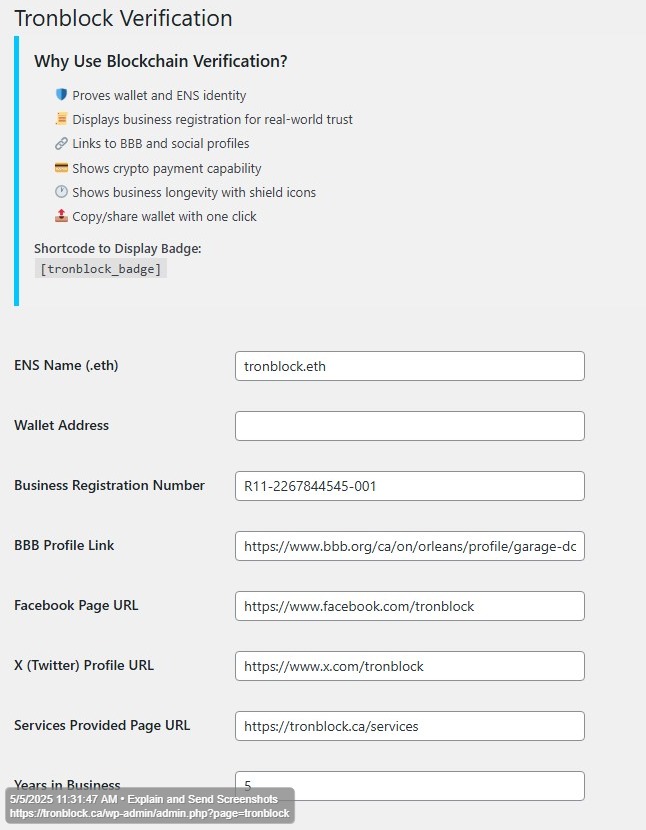
Tronblock Admin Panel & Verification Process
The Tronblock backend admin panel is where you securely enter all your verification details. Every piece of information—your .eth name, DNS record, and business registration number—is cross-checked in real-time to ensure full authenticity.
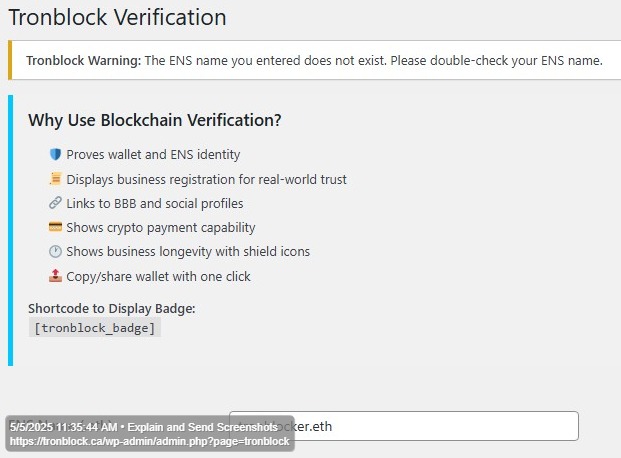
ENS Validation: If the .eth name you provide does not match the official ENS records, a warning will immediately appear. This failed attempt is logged on the blockchain ledger. Repeated mismatches from the same website will trigger a security flag, marking the site as potentially fraudulent.
DNS Verification: Tronblock installs a DNS record to bind your domain to your blockchain ID. If this record does not correspond to the Tronblock-registered ENS name, your website will be flagged and added to the unverified sites list.
Business Registration Match: Your business registration number is checked against public ownership records (e.g., WHOIS). Any mismatch between your registration and domain ownership will result in your site being flagged and added to the unverified website ledger.
Tronblock maximizes blockchain’s potential to protect your site. Every verification attempt, success, and failure is immutably recorded, ensuring transparency and accountability. This robust system makes Tronblock a serious guardian of online trust and security.


 Tronblock Verified
 ENS:
tronblocks.eth
ENS:
tronblocks.eth
 Business Reg #: R11-2267844545-001
 Y/I/B:
🛡️
Y/I/B:
🛡️
If you don't have a browser wallet installed, a QR code will appear. Scan it with your mobile wallet (Trust, MetaMask, Coinbase Wallet, etc.) to complete your payment.